
On-Page SEO St. Thomas: How to Optimize Every Page for Local Search
You own a business on St. Thomas. Maybe you fix pipes in Tutu, serve conch fritters in Frenchtown, or run tours out of Red Hook. Your work is great. But when someone in Charlotte Amalie searches for what you do, your website is nowhere to be found. Meanwhile, a competitor with a worse product shows up first on Google.
This happens more than you’d think. And it’s rarely about quality. It’s about on-page SEO St. Thomas businesses either get right or completely ignore.
On-page SEO means fixing what’s on your actual website pages, your titles, your text, your images, so Google understands exactly what you do and who you do it for. Get this right, and you start showing up when island residents and visitors search for your services. Get it wrong, and you stay invisible no matter how good your business is.
This guide walks you through exactly how to fix it, page by page, with real examples for St. Thomas businesses like yours.
Why On-Page SEO Matters So Much on a Small Island
Here’s something most business owners don’t realize: local SEO St. Thomas works differently than SEO in a big mainland city.
In a city like Miami, hundreds of plumbers compete for the same search terms. On St. Thomas, you might be one of a dozen. That means the businesses who bother to optimize their websites properly can jump ahead fast, because most of your competitors aren’t doing it at all.
There’s also a unique mix of customers here. You’ve got:
- Residents searching from home or work, looking for something nearby and reliable
- Tourists and cruise passengers searching on their phones, often with just a few hours before their ship leaves
Both groups search differently, and your website needs to speak to both. If your homepage only says “serving the Virgin Islands” without ever mentioning Red Hook, Frenchtown, or Charlotte Amalie by name, you’re missing a big chunk of the people actually typing those words into Google.
That’s what on-page SEO St. Thomas is really about: making sure your website speaks the exact language your customers are searching in.
What Is On-Page SEO? (In Plain English)
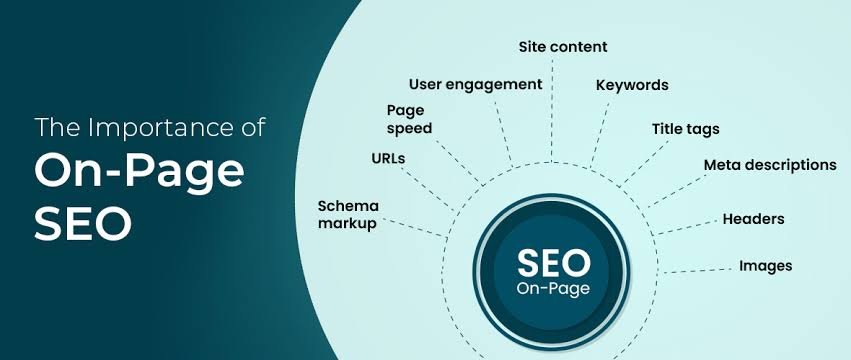
On-page SEO is everything you can control directly on your website pages. Think of it like this: your website is a store, and on-page SEO is how clearly you label your shelves.
If a customer walks in looking for plumbing repair and your shelves say nothing about plumbing, they’ll leave confused. Google works the same way. It reads your page, and if it can’t clearly tell what you offer and where you offer it, it won’t show your page to the right people.
On-page SEO covers things like:
- Your page titles
- Your headings
- The words in your content
- Your images
- Your website’s structure and speed
Let’s go through each one, step by step, with real St. Thomas examples.
Step 1: Fix Your Title Tags First
Your title tag is the blue clickable headline that shows up in Google search results. It’s the very first thing a potential customer sees about your business.
What to do:
- Keep it under 60 characters so it doesn’t get cut off
- Put your main service and your location near the front
- Skip generic titles like “Home” or “Welcome”
Example for a plumber in Tutu: Instead of “Home | ABC Plumbing,” write “Emergency Plumber in Tutu, St. Thomas | ABC Plumbing”
Example for a restaurant in Frenchtown: Instead of “Menu,” write “Best Caribbean Restaurant in Frenchtown, St. Thomas”
Every page on your site needs its own unique title. Don’t copy the same one across your homepage, contact page, and service pages.
Step 2: Write Meta Descriptions That Get Clicks
The meta description is the small block of text under your title in Google search results. It doesn’t directly boost your ranking, but it’s often the reason someone clicks your link instead of a competitor’s.
What to do:
- Aim for around 150 to 155 characters
- Mention your service and your neighborhood
- Give people a reason to click, like a specialty, a fast response time, or free estimates
Example: “Need a plumber in Red Hook fast? ABC Plumbing offers same-day repairs across St. Thomas. Call now for a free estimate.”
Write a new one for every page. Copying the same description everywhere is one of the most common mistakes small business sites make.
Step 3: Clean Up Your URL Structure
Your URL is the web address of each page. A messy URL confuses both Google and your customers.
What to do:
- Keep URLs short and readable
- Use your service and location naturally
- Avoid random numbers or symbols
Good example: thedlab.com/plumber-tutu-st-thomas Bad example: thedlab.com/page?id=4829
If you’re not sure how to change your URLs safely, this is a good task to bring to an SEO team so you don’t accidentally break existing links.
Step 4: Use Header Tags the Right Way
Header tags (H1, H2, H3) organize your page content so both people and Google can scan it quickly.
What to do:
- Use exactly one H1 per page, this is your main headline
- Use H2s for major sections
- Use H3s for smaller supporting points under each H2
Example H1 for a tour company: “Snorkeling Tours Departing From Red Hook, St. Thomas”
Example H2s underneath it:
- What’s Included in Our Snorkeling Tour
- Pricing and Booking
- Frequently Asked Questions
This structure helps Google understand your page is genuinely about snorkeling tours in Red Hook, not just a random mention buried somewhere in the text.
Step 5: Write Content That Matches What People Are Searching
This is where a lot of websites fail. They either write almost nothing, or they write generic content that could apply to any business anywhere.
What to do:
- Mention your neighborhood by name (Red Hook, Frenchtown, Charlotte Amalie, East End) instead of only saying “St. Thomas”
- Answer the actual questions your customers ask
- Keep paragraphs short and easy to read
Example for a plumber: Instead of “We provide plumbing services,” write something like: “Our licensed plumbers serve homes and businesses across Tutu, Red Hook, and Charlotte Amalie. Whether it’s a burst pipe or a slow leak, we show up fast.”
Think about the difference between someone searching “plumber near me” versus “how much does a plumber cost in St. Thomas.” One wants to book now. The other wants information first. Your content should answer both.
Step 6: Add Alt Text to Every Image
Alt text is a short description you add to each image on your website. Google can’t “see” pictures the way people can, so alt text tells it what’s in the photo.
What to do:
- Describe the image clearly and naturally
- Mention your location where it makes sense
Example: Instead of leaving it blank or writing “image1,” write “Fresh grilled mahi-mahi plate at our Frenchtown restaurant.”
This also helps you show up in Google Image search, which a surprising number of tourists use when looking for restaurants and activities.
Step 7: Make Sure Your Site Works Perfectly on Mobile
Most people searching for local businesses on St. Thomas, especially tourists, are on their phones. If your site is hard to use on a small screen, they’ll leave in seconds.
What to check:
- Text is readable without zooming in
- Buttons and phone numbers are easy to tap
- Menus and booking forms work smoothly on mobile
Google also uses your mobile site, not your desktop site, to decide your ranking. If your mobile experience is bad, your rankings suffer everywhere.
Step 8: Speed Up Your Pages
A slow website loses customers before they even see what you offer. This matters even more here, since a lot of visitors are using hotel Wi-Fi or mobile data with inconsistent speed.
Quick fixes:
- Compress large photos before uploading them
- Remove plugins or features you don’t actually use
- Test your site using Google’s free PageSpeed Insights tool
Even small improvements here can noticeably reduce how many visitors bounce off your site before it finishes loading.
Step 9: Add Schema Markup
Schema markup is a bit of code added to your website that explains your business details directly to Google, things like your name, address, phone number, hours, and reviews.
Why it matters:
- Helps you show up with extra details in search results, like star ratings
- Makes it easier for Google to confirm your exact location and service area
- Increasingly important as more people use AI tools like ChatGPT and Google’s AI search results to find local businesses
This one usually requires some technical help, since it’s added directly to your website’s code. It’s worth doing right the first time.
Step 10: Link Your Pages Together
Internal linking means connecting pages on your own website to each other. Most small business sites completely skip this.
Example:
- Link your homepage to your main service pages
- Link a blog post about “Best Beaches Near Red Hook” to your tour booking page
- Use descriptive link text like “book a Red Hook snorkeling tour” instead of just “click here”
This helps visitors find more of your site, and it helps Google understand which pages matter most to you.
Real Examples: How This Plays Out for St. Thomas Businesses
A plumber in Tutu who only had one page saying “plumbing services” started splitting content into separate pages for emergency repairs, water heater installation, and drain cleaning, each mentioning Tutu and nearby neighborhoods by name. Search visibility for multiple services improved instead of just one generic page competing weakly for everything.
A restaurant in Frenchtown had a meta description that just said “Welcome to our website,” the default text nobody bothered to change. Writing a real description mentioning the cuisine, the neighborhood, and hours immediately improved how often people clicked through from search results.
A tour operator in Red Hook combined kayaking, snorkeling, and sailing tours into one thin page. Splitting them into three focused pages, each optimized for its own keyword, helped all three services start ranking instead of none of them ranking well.
Common Mistakes to Avoid
- Using the same title tag and meta description on every page
- Only mentioning “St. Thomas” and never your actual neighborhood
- Stuffing keywords unnaturally instead of writing normally
- Leaving images without alt text or naming them “IMG1234.jpg”
- Cramming multiple services onto one thin page instead of giving each its own page
- Ignoring how your site looks and works on mobile
- Letting old pricing, hours, or seasonal info sit outdated for months
Frequently Asked Questions
What is On-Page SEO St. Thomas, and why does my business need it?
It’s the process of optimizing your website’s titles, content, and structure so Google understands what your business offers and shows you to the right local customers. Without it, even a great business can stay invisible online.
How long does it take to see results from on-page SEO?
Most small businesses start seeing movement within a few weeks, with stronger results building over two to three months as Google re-crawls and re-ranks your updated pages.
Do I need to hire an SEO company, or can I do this myself?
You can absolutely start with the basics yourself, titles, descriptions, and content. Technical pieces like schema markup and site speed often go faster and safer with professional help.
Should I mention specific neighborhoods like Red Hook or Frenchtown on my website?
Yes. Many people search by neighborhood name, not just “St. Thomas.” Pages that only say “St. Thomas” miss a large share of local searches.
How is on-page SEO different from local SEO overall?
On-page SEO is what you optimize directly on your website pages. Local SEO also includes things outside your site, like your Google Business Profile, reviews, and business directory listings. Both work together.
Ready to Get Found on St. Thomas?
Fixing your on-page SEO isn’t something you need to figure out alone, or get wrong the first time. Every mistake costs you visibility, and every month you wait is a month competitors get ahead.
Get professional SEO help from The D Lab. We specialize in St. Thomas SEO services built specifically for local businesses, from title tags and content to schema markup and full website strategy. We know the difference between writing for Red Hook and writing for Charlotte Amalie, and we build every page to reflect it.
Contact The D Lab today for a free website review and find out exactly what’s keeping your business off page one.
