
Schema Markup for Local Businesses: A Beginner’s Guide
Schema markup is a small piece of code you add to your website that tells search engines exactly what your content means, not just what it says. For a local business, it translates your name, address, phone number, hours, reviews, and services into a language Google understands with certainty, which helps you earn rich results (the star ratings, business details, and enhanced listings you see in search) and improves how AI-powered search understands your business. This guide explains schema markup in plain terms, shows the exact types a local business should use, and walks through how to add and test it, even if you have never touched code. If you would rather have it done for you, The Digital Lab includes structured data as part of search engine optimization.
Quick answer. Schema markup (structured data) is code, usually written in a format called JSON-LD, that labels your website’s information so search engines understand it precisely. Local businesses should add LocalBusiness schema (with the correct sub-type like Restaurant or Plumber), plus Organization, and where relevant Review, Product or Service, FAQPage, and BreadcrumbList. Add it to your pages, then validate it with Google’s Rich Results Test and the Schema Markup Validator. Correct schema does not directly boost rankings, but it earns rich results and helps Google and AI search trust and display your business.

Introduction
Search engines read the words on your page, but they do not automatically know that “Sunrise Cafe” is a business name, that a string of numbers is a phone number, or that “4.8 stars” is a customer rating. Schema markup removes that guesswork. It is a shared vocabulary, created by the major search engines through a project called Schema.org, that lets you label each piece of information so its meaning is unmistakable. When you do this well, Google can display your business more richly in search results and feed accurate details into the AI answers that increasingly sit above the traditional links.
This guide is written for local business owners and marketers who are new to structured data. It explains what schema markup is and why it matters, the specific types local businesses need, how to add it without breaking your site, and how to test it. It pairs with our other foundational guides, including the technical SEO checklist for small business websites, since structured data is part of a healthy technical foundation, and our guide to on-page SEO and optimizing every page for local search.
What Is Schema Markup?
Schema markup, also called structured data, is standardized code that describes the meaning of your content to search engines. Instead of leaving Google to interpret your page, schema explicitly states “this is the business name,” “this is the address,” “this is the opening hours,” and so on. The vocabulary comes from Schema.org, a collaboration between Google, Microsoft, Yahoo, and Yandex, which is why it works across search engines.
It helps to separate three terms that are often confused. Structured data is the general concept of labeling content with meaning. Schema.org is the shared vocabulary of labels everyone agrees to use. JSON-LD is the recommended format, a block of code you place on the page, that carries those labels. As a beginner you do not need to master the theory; you need to know which labels your business should use and how to add them correctly, both of which this guide covers.
Why Schema Markup Matters for Local Businesses
Schema markup matters because it changes how, and how prominently, your business appears in search. Three benefits stand out for local businesses.
Rich results. Schema can qualify your listing for enhanced search features: star ratings, business hours, price ranges, event details, and FAQ dropdowns. These make your result larger and more trustworthy, which improves click-through even at the same ranking position.
Clarity for local and AI search. Structured data gives Google unambiguous facts about your business, which supports how you appear in the local map pack and how accurately AI-powered search and assistants describe you. As search shifts toward AI answers, having your details machine-readable is increasingly valuable.
Consistency and trust. Schema reinforces the same name, address, and phone number that appear across your site and directories, strengthening the consistency signals that local rankings depend on.
One honest caveat sets expectations correctly: schema markup is not a direct ranking factor. Adding it will not, by itself, move you up the results. What it does is help search engines understand and display your business better, which earns rich results and supports the other work that does drive rankings, such as the fundamentals covered in our SEO service.
Schema Types Every Local Business Should Use
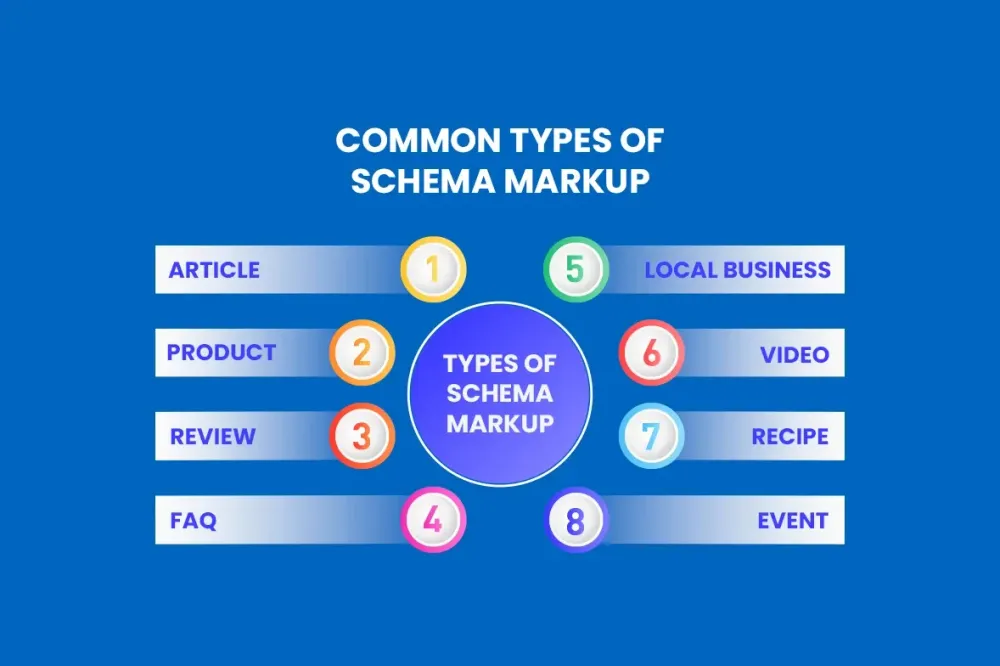
You do not need dozens of schema types. A focused set covers almost every local business.
LocalBusiness. The core type for any business with a physical location or defined service area. It carries your name, address, phone, hours, geo-coordinates, price range, and more. Wherever possible, use the specific sub-type that matches your business, such as Restaurant, Dentist, Plumber, Attorney, Store, or HomeAndConstructionBusiness, because the more specific type gives search engines richer understanding.
Organization. Describes your business as an entity, including your logo and social profiles, which helps establish your brand across the web.
Review and AggregateRating. Marks up genuine customer reviews and your average rating so star ratings can appear in search. Only mark up reviews you truly have, and follow Google’s rules about self-serving reviews.
Product or Service. For the products you sell or the services you offer, with details like descriptions and price ranges, which can support enhanced listings.
FAQPage. Marks up a genuine list of questions and answers on a page so they can appear as expandable results, a strong fit for service and location pages.
BreadcrumbList. Marks up your navigation path so search results can show a clean breadcrumb trail instead of a raw URL.
Most local businesses start with LocalBusiness and Organization, then add Review, FAQPage, and BreadcrumbList where they genuinely apply. Choosing the right service or product schema often follows from understanding what customers search for, which is where our guide to keyword research for local businesses connects.
The LocalBusiness Schema Fields That Matter
For LocalBusiness schema, completeness matters. Include your exact business name, full street address, phone number, and website URL, all matching what appears elsewhere online. Add your opening hours, your geographic coordinates so maps can place you precisely, your price range, and links to your social profiles. If you serve customers at their location rather than yours, define your service area. The goal is a complete, accurate profile in code that mirrors the real, consistent details a customer would find anywhere they encounter your business. Inconsistency here undermines the trust schema is meant to build, so treat name, address, and phone accuracy as non-negotiable.
How to Add Schema Markup: Three Beginner-Friendly Methods
You can add schema markup whether or not you write code. Choose the method that matches your setup.
Method 1: A plugin or app. If your site runs on a platform like WordPress, a reputable SEO or schema plugin can generate and insert LocalBusiness and other schema through simple settings, no code required. This is the easiest route for most small businesses.
Method 2: A schema generator plus paste. Free schema generator tools let you fill in a form with your business details and produce a ready-made JSON-LD block. You then paste that block into your page’s HTML, ideally in the head section. This gives you control without writing code from scratch.
Method 3: Hand-coded JSON-LD. For full control, you or a developer write the JSON-LD directly. This is the most flexible method and the one professionals use, but it is the least beginner-friendly. Structured data is part of the technical foundation our team implements, which is why it sits alongside the work in our technical SEO guidance.
Whichever method you use, place your primary LocalBusiness schema on your homepage or a dedicated contact or location page, and add page-specific schema (like FAQPage or Product) on the relevant pages rather than sitewide.
How to Test and Validate Your Schema
Never assume schema works; always test it. Two free tools do the job. Google’s Rich Results Test checks whether your page is eligible for rich results and shows which enhancements Google detected. The Schema Markup Validator (from Schema.org) checks that your structured data is technically valid and flags syntax errors and missing required fields. Run both after adding schema, fix any errors or warnings they report, and then monitor the Enhancements and rich result reports in Google Search Console over time to see how your markup performs and to catch new errors. Testing is quick, and it is the step that separates schema that works from schema that silently fails.
Common Schema Markup Mistakes to Avoid
Beginners tend to make the same handful of errors. Marking up content that is not visible on the page, or that does not exist, violates Google’s guidelines and can lead to a manual action, so only mark up real, visible information. Marking up fake or self-serving reviews is a specific version of this and is against the rules. Using a generic LocalBusiness type when a specific sub-type exists wastes an opportunity for richer understanding. Inconsistent name, address, and phone details between your schema and the rest of your web presence undercut the trust signal. Adding schema and never testing it leaves errors undetected. And expecting schema alone to lift rankings sets you up for disappointment, because its job is understanding and display, not a direct ranking boost. Avoiding these keeps your markup both effective and safe.
Schema Markup Checklist for Local Businesses
Use this to implement and maintain your structured data:
- LocalBusiness schema added with the correct specific sub-type
- Name, address, phone, and URL match your site and directories exactly
- Opening hours, geo-coordinates, and price range included
- Organization schema with logo and social profiles added
- Review and AggregateRating markup used only for genuine reviews
- FAQPage schema added on pages with real questions and answers
- BreadcrumbList schema added for navigation paths
- Product or Service schema added where relevant
- Only visible, real content marked up
- Validated with the Rich Results Test and Schema Markup Validator
- Enhancement and rich result reports monitored in Search Console
When to Get Professional Help
You can add basic schema yourself with a plugin or generator, and for a simple site that is often enough. The point where most owners bring in help is when they need multiple schema types working together correctly, when validation errors are hard to diagnose, when a larger or custom-built site needs hand-coded structured data, or when they want schema implemented as part of a complete SEO strategy rather than in isolation. The Digital Lab implements and validates structured data as part of our SEO work. Explore our SEO service, see our work, or contact us to have schema set up correctly on your site.
Frequently Asked Questions
What is schema markup? Schema markup, or structured data, is code you add to your website that tells search engines the precise meaning of your content, such as which text is your business name, address, hours, or reviews.
What is schema markup used for? It helps search engines understand your content so you can earn rich results (like star ratings and business details) and so AI-powered search describes your business accurately.
Does schema markup improve rankings? Not directly. Schema is not a ranking factor, but it earns rich results, improves click-through, and helps search engines and AI understand your business, which supports your overall SEO.
What is JSON-LD? JSON-LD is the recommended format for schema markup, a block of code placed on your page that carries the structured data labels. Google prefers it over older formats.
What schema should a local business use? Start with LocalBusiness (using a specific sub-type like Restaurant or Plumber) and Organization, then add Review, Product or Service, FAQPage, and BreadcrumbList where they genuinely apply.
What is LocalBusiness schema? LocalBusiness schema is the core structured data type for a business with a physical location or service area, carrying details like name, address, phone, hours, coordinates, and price range.
Should I use a specific business sub-type? Yes. Using a specific sub-type such as Dentist, Attorney, or Store instead of the generic LocalBusiness gives search engines richer understanding of what you do.
How do I add schema markup to my website? Use an SEO or schema plugin, paste a JSON-LD block from a free schema generator into your page’s HTML, or have a developer hand-code it. Plugins are the easiest route for beginners.
Do I need to know how to code to add schema? No. Plugins and schema generators let you add structured data through forms and settings without writing code, though hand-coding gives the most control.
How do I test my schema markup? Use Google’s Rich Results Test to check eligibility for rich results and the Schema Markup Validator to confirm the code is valid, then monitor Search Console for enhancement reports.
What are rich results? Rich results are enhanced search listings, such as star ratings, hours, price ranges, and FAQ dropdowns, that schema markup can make your business eligible for.
Can schema markup get me penalized? It can if you mark up content that is not visible on the page, does not exist, or includes fake or self-serving reviews. Only mark up real, visible information to stay safe.
Where should I put schema on my site? Place your main LocalBusiness schema on your homepage or a contact or location page, and add page-specific schema like FAQPage or Product only on the relevant pages.
Does schema help with AI and voice search? Yes. Structured data gives AI-powered search and assistants clear, machine-readable facts about your business, which helps them describe and surface you accurately.
What is the difference between structured data, Schema.org, and JSON-LD? Structured data is the concept of labeling content with meaning, Schema.org is the shared vocabulary of labels, and JSON-LD is the code format that delivers those labels on your page.
Can I use Review schema for my Google reviews? You can mark up genuine reviews you have collected, following Google’s rules. Be careful with self-serving reviews, which are against the guidelines.
How often should I update my schema? Update it whenever your business details change, such as hours, address, phone, or services, and re-validate after any change so search engines have accurate information.
Is FAQ schema still worth adding? Yes, for genuine question-and-answer content on relevant pages. It communicates your content clearly and can enhance how your pages appear, though display of FAQ rich results varies.
Will schema markup fix my SEO on its own? No. Schema is one part of a healthy site. It supports understanding and display but works best alongside solid technical, on-page, content, and off-page SEO.
How do I get help implementing schema markup? Contact The Digital Lab to have LocalBusiness and supporting schema implemented and validated correctly as part of a complete SEO strategy for your business.
